Phobos Ransomware — Malware Analysis Walkthrough
Deep analysis of Phobos ransomware: encrypted configuration, process termination, persistence mechanisms, and file encryption strategies.
Overview
| Platform | CyberDefenders |
| Category | Malware Analysis |
| Difficulty | Insane |
| Focus | Ransomware · AES Config Decryption · Registry Persistence · Process Termination |
| Lab Link | Phobos |
Phobos is a well-known ransomware family that has been active since 2018. This challenge walks through analyzing a real Phobos sample, focusing on its encrypted configuration system, anti-analysis techniques, and encryption methodology.
The malware employs:
- AES-encrypted configuration with indexed entries
- CRC32 integrity checking to detect tampering
- Process termination to release file locks before encryption
- Registry persistence via Run keys
- Dual encryption strategy for small vs large files
Tools Used
- IDA Pro (static analysis, decompilation)
- x32dbg (dynamic analysis, config extraction)
- PE-bear / DIE (PE metadata inspection)
Objective
The goal of this analysis is to fully understand Phobos ransomware’s execution chain:
- How it protects its configuration from analysis
- How it achieves persistence and privilege escalation
- How it terminates security software before encryption
- How it decides which encryption strategy to use
By the end, we will have mapped the complete attack lifecycle from initial execution to file encryption.
Q1 — Hashing Algorithm Identification
Question
What is the hashing algorithm used by the malware?
What we look for
Malware commonly uses hashing for:
- Integrity checking — verify code hasn’t been tampered
- API hashing — resolve APIs without plaintext strings
- Configuration validation — ensure encrypted config is intact
Common algorithms to watch for: | Algorithm | Characteristics | | ——— | ——————————————- | | CRC32 | Lookup table, XOR operations, 32-bit output | | MD5 | 128-bit output, complex rounds | | djb2 | Simple multiply-add loop, no table | | ROR13 | Rotate-right operations |
Analysis
During static analysis, I identified a function at sub_4085D9 (0x004085D9) performing data hashing:
1
2
3
4
5
6
7
8
9
10
11
int __usercall sub_4085D9@<eax>(int a1@<eax>, _BYTE *a2@<ecx>, int a3)
{
  unsigned int v3; // eax
  v3 = ~a1;
  while ( a3 )
  {
    --a3;
    v3 = lookup_table[(unsigned __int8)(v3 ^ *a2++)] ^ (v3 >> 8);
  }
  return ~v3;
}
Identification markers:
| Feature | Observation | CRC32 Signature |
|---|---|---|
| Initialization | v3 = ~a1 | ✓ Bitwise NOT |
| Lookup table | 256 entries at 0x40B000 | ✓ Precomputed table |
| Core loop | table[v3 ^ byte] ^ (v3 >> 8) | ✓ Standard CRC32 |
| Finalization | return ~v3 | ✓ Final inversion |
| Output size | 32-bit integer | ✓ CRC32 |
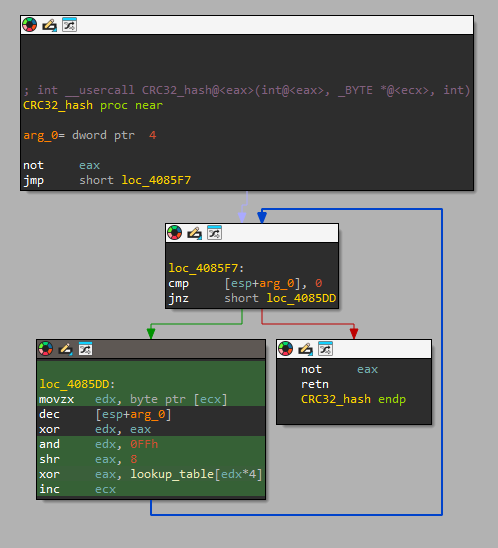 CRC32 implementation with lookup table
Answer: CRC32
Q2 — .cdata Checksum Value
Question
Could you provide the hard-coded value of the .cdata checksum?
What we look for
After identifying a hashing algorithm, the next step is understanding how it’s used.
Common use cases:
- Anti-debugging checks
- Code integrity verification
- Configuration validation
We trace cross-references to the hash function to find where the computed hash is compared against a stored value.
Analysis
Following xrefs to sub_4085D9 (0x004085D9), I found an integrity check in the malware’s initialization:
1
2
if ( CRC32_hash(0, v0, dword_40B40C) != dword_40B430 )
    return;  // Exit if tampered
This is an anti-tampering mechanism — the malware verifies its .cdata section hasn’t been modified.
The hardcoded checksum at dword_40B430 (0x0040B430):
1
.data:0040B430 dword_40B430    dd 0D55F8833h    ; DATA XREF: real_Start+62↑r
This anti-tampering mechanism serves multiple purposes:
- Prevents AV modification — if antivirus patches the binary, it won’t run
- Detects analyst tampering — modifications during analysis will fail
- Ensures payload integrity — encrypted config must be intact
Answer: 0xD55F8833
Q3 — Malware Version
Question
What is the malware’s version?
What we look for
Ransomware families like Phobos store configuration in encrypted blobs to evade static analysis. To extract config values, we need to:
- Identify the decryption function — usually takes an index/ID parameter
- Set breakpoints at function entry and return
- Monitor parameters to understand which config is being decrypted
- Capture return values containing decrypted strings
This approach reveals all encrypted strings without needing to reverse the encryption algorithm.
Analysis
The malware stores its configuration in an AES-encrypted blob. I identified two key functions:
| Function | Address | Purpose |
|---|---|---|
sub_4062A6 | 0x004062A6 | Initialize config structure |
sub_406347 | 0x00406347 | Decrypt config entry by ID |
Dynamic Extraction
To find the version, I set breakpoints in x32dbg:
- Entry breakpoint at
sub_406347(0x00406347) — check[esp+4]for config ID - Return breakpoint at 0x00406431 — check
EAXfor decrypted data pointer
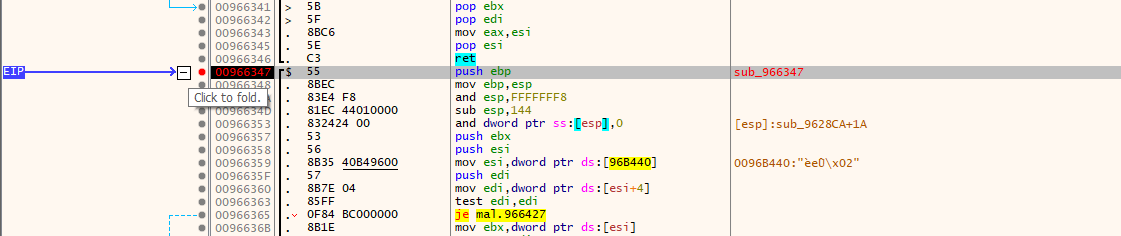 Breakpoint hit at config decryption function
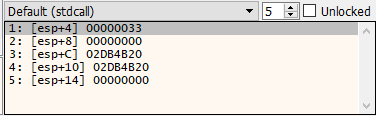 Stack showing config index 0x33 (51)
After stepping over, EAX contains the decrypted version string:
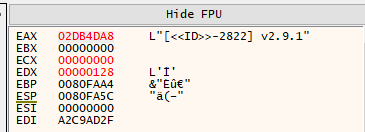 EAX pointing to decrypted version: “[«ID»-2822] v2.9.1”
The version format [<<ID>>-XXXX] vX.X.X is characteristic of Phobos variants, where:
<<ID>>— placeholder for victim ID2822— campaign/affiliate identifierv2.9.1— actual version number
Answer: v2.9.1
Q4 — DLL Masquerading
Question
The malware masquerades as a legitimate Windows DLL. Which DLL does it impersonate?
What we look for
Malware often disguises itself using legitimate-sounding names to:
- Evade casual inspection
- Blend in with legitimate system files
- Bypass simple allowlist-based security
We inspect PE metadata (Version Information resource) to identify claimed identity.
Analysis
Using DIE to inspect the Version Information resource:
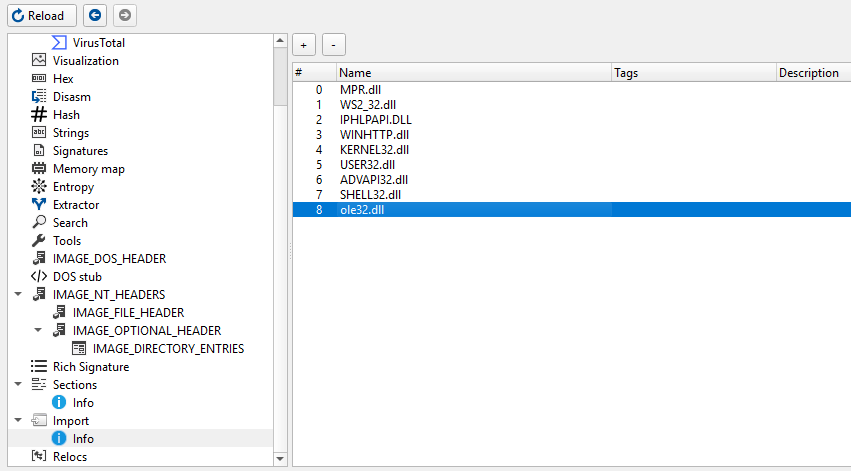 PE metadata showing ole32.dll masquerade
The malware claims to be ole32.dll — Microsoft’s OLE (Object Linking and Embedding) library.
Why ole32.dll? The malware legitimately imports OLE32 functions:
CoInitializeEx/CoUninitializeCoCreateInstance
These are used for WMI access to delete shadow copies. The masquerade creates a coherent cover story.
Why this matters:
- If security tools see
ole32.dllmaking COM calls, it appears normal - The real
ole32.dllis a core Windows component, not suspicious - Sophisticated masquerading — not just random name choice
Answer: ole32.dll
Q5 — First API Function Called
Question
Could you provide the first API function that is called by the malware?
What we look for
Understanding the first API call reveals the malware’s immediate priorities:
- Privilege escalation?
- Environment detection?
- Anti-analysis checks?
We trace execution from the entry point, following the call chain until we hit an external API.
Analysis
Tracing from the entry point sub_402FA7 (0x00402FA7) → sub_4029F5 (0x004029F5), I found the first significant operation:
The malware checks if it’s running with elevated privileges. If not, it attempts to restart itself with elevated privileges via sub_40489E (0x0040489E):
1
2
3
4
5
6
7
BOOL sub_40489E()
{
  // ...
  StartupInfo.cb = 68;
  v5 = CreateProcessW(0, v0, 0, 0, 0, 0, 0, 0, &StartupInfo, &ProcessInformation);
  // ...
}
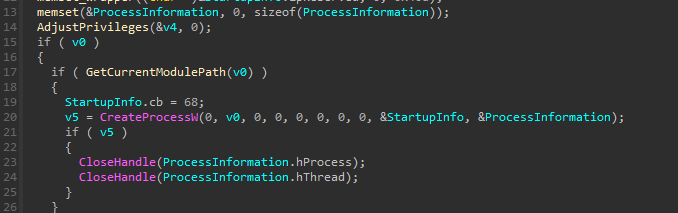 CreateProcessW call at 0x0040490E inside sub_40489E
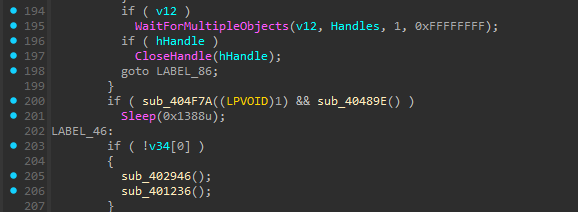 sub_40489E called from MalwareMain (sub_4029F5) at 0x00402C74
Before any encryption or spreading occurs, the malware calls CreateProcessW to elevate privileges.
Execution flow:
1
2
3
4
5
6
7
8
9
Entry Point (sub_402FA7)
    ↓
MalwareMain (sub_4029F5)
    ↓
Check if Admin (IsElevated)
    ↓
If not admin → RestartAsAdmin (sub_40489E)
    ↓
CreateProcessW ← FIRST API CALL
This is a classic UAC bypass pattern — restart with elevated privileges before performing destructive operations.
Answer: CreateProcessW
Q6 — Process List Decryption Address
Question
Could you provide the address at which the process list decryption function is called?
What we look for
Ransomware must kill processes that hold file locks before encryption:
- Database servers (SQL, Oracle, MySQL)
- Office applications (Excel, Word)
- Backup software (Veeam, Acronis)
- Email clients (Outlook, Thunderbird)
We search for:
- Process enumeration APIs (
CreateToolhelp32Snapshot,Process32First/Next) - Process termination (
TerminateProcess) - Then trace back to find where the kill list is decrypted
Analysis
Ransomware typically kills processes that lock files (SQL, backup software, etc.).
I found sub_4022EE (0x004022EE) — the process killer thread:
1
2
3
4
5
6
7
8
9
10
int __stdcall sub_4022EE(LPVOID lpThreadParameter)
{
  v5 = (__int16 *)sub_406347(10, 0);  // ← Decrypt config ID 10 (process list)
  // ...
  while ( !sub_405962() )
  {
    sub_404DEE(lpMem);   // Kill matching processes
    Sleep(0x1F4u);
  }
}
The call to sub_406347 (0x00406347) with config index 10 happens at address 0x004022FB:
1
2
.text:004022F9  push    0Ah              ; Config ID = 10 (process list)
.text:004022FB  call    sub_406347       ; ← THIS ADDRESS
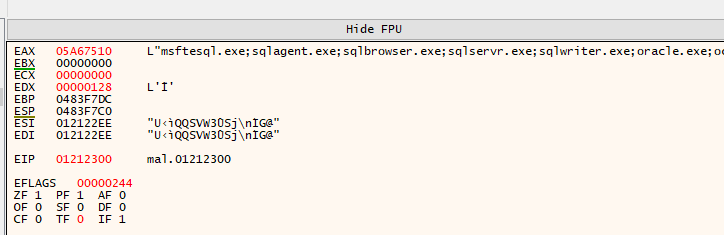 EAX containing decrypted process names: msftesql.exe, sqlagent.exe, sqlbrowser.exe…
Decrypted process kill list includes:
| Category | Processes |
|---|---|
| SQL Servers | msftesql, sqlagent, sqlservr, mysql |
| Oracle | oracle, ocssd, dbsnmp |
| Office Apps | excel, outlook, powerpnt, onenote |
| thunderbird, thebat | |
| Backup | sqbcoreservice |
These processes hold exclusive locks on database files, documents, and emails. Killing them allows the ransomware to encrypt files that would otherwise be inaccessible.
Answer: 0x004022FB
Q7 — First Security Disable Command
Question
What’s the first command the malware uses to turn off a critical security measure?
What we look for
Before encryption, ransomware typically:
- Disables Windows Firewall — prevent network-based detection
- Deletes shadow copies — prevent recovery via VSS
- Disables Windows Defender — evade real-time protection
- Clears event logs — destroy forensic evidence
We monitor decrypted config strings for shell commands.
Analysis
Setting a breakpoint on the config decryption function and monitoring returns, I captured:
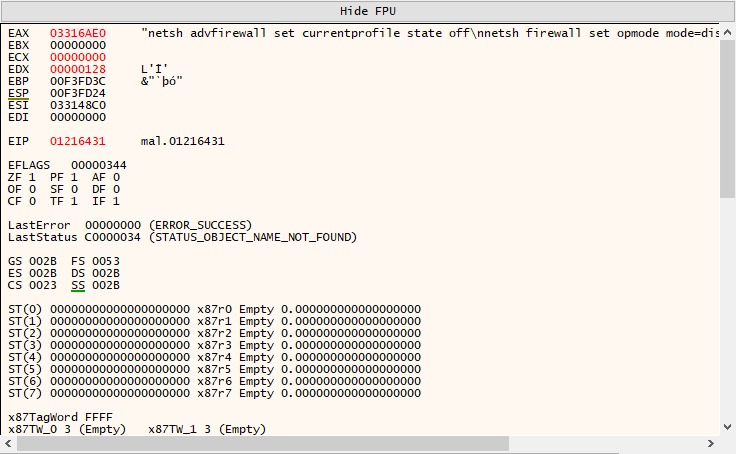 EAX containing firewall disable commands
1
2
3
netsh advfirewall set currentprofile state off
netsh firewall set opmode mode=disable
exit
The first command disables Windows Firewall using the modern netsh advfirewall syntax.
Command breakdown:
| Command | Purpose | Windows Version |
|---|---|---|
netsh advfirewall set currentprofile state off | Disable firewall | Vista+ |
netsh firewall set opmode mode=disable | Disable firewall | XP (legacy) |
The malware includes both commands for maximum compatibility across Windows versions.
Why disable the firewall?
- Allow C2 communication without interference
- Enable lateral movement across the network
- Prevent network-based security tools from blocking traffic
Answer: netsh advfirewall set currentprofile state off
Q8 — Persistence Function Address
Question
Could you provide the address of the function used by the malware for persistence?
What we look for
Ransomware persistence ensures the malware survives reboots and can:
- Continue encryption if interrupted
- Re-encrypt new files after restart
- Maintain foothold for additional attacks
Common persistence mechanisms:
- Registry Run keys —
HKLM/HKCU\...\Run - Scheduled Tasks —
schtasks.exe - Services —
sc.exe create - Startup folder —
shell:startup
We search for registry APIs: RegOpenKeyEx, RegSetValueEx, RegCreateKey.
Analysis
Following xrefs to RegSetValueExW:
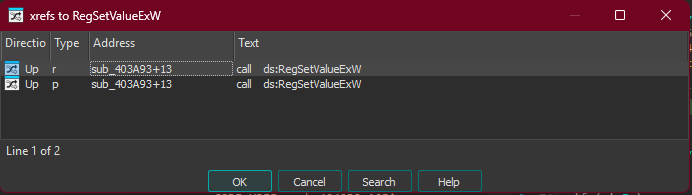 Cross-references to RegSetValueExW
This leads to sub_403A93 (0x00403A93), which is called from the main persistence function:
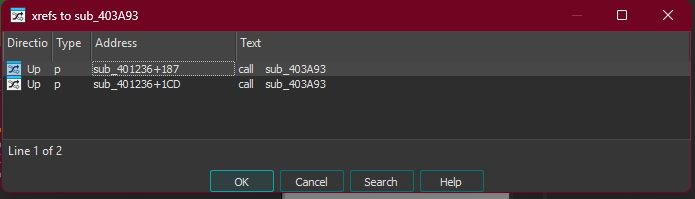 sub_403A93 called from sub_401236
The persistence function at sub_401236 (0x00401236):
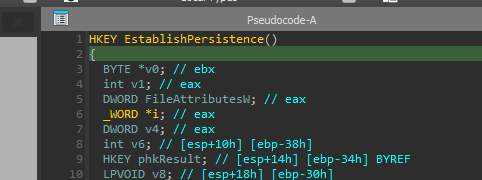 Persistence function writing to Run keys
This function:
- Copies itself to a new location
- Writes to
HKLM\...\RunandHKCU\...\Run - Sets the copied file as HIDDEN (attribute 0x2)
Persistence locations:
| Registry Key | Scope |
|---|---|
HKLM\SOFTWARE\Microsoft\Windows\CurrentVersion\Run | All users (requires admin) |
HKCU\SOFTWARE\Microsoft\Windows\CurrentVersion\Run | Current user only |
By writing to both locations, the malware ensures persistence regardless of privilege level.
Answer: 0x00401236
Q9 — C2 Communication Protocol
Question
What protocol is used by the malware for C2 communication?
What we look for
Malware C2 communication typically uses:
- HTTP/HTTPS — blends with normal web traffic
- DNS — often allowed through firewalls
- Custom protocols — harder to detect but more suspicious
We check the Import Address Table (IAT) for networking libraries.
Analysis
Examining the import table reveals WINHTTP.dll imports:
 WINHTTP imports: WinHttpOpen, WinHttpConnect, WinHttpSendRequest…
| Import | Purpose |
|---|---|
WinHttpOpen | Initialize WinHTTP |
WinHttpConnect | Connect to server |
WinHttpOpenRequest | Create HTTP request |
WinHttpSendRequest | Send request |
WinHttpReceiveResponse | Receive response |
All WinHttp* functions = HTTP protocol.
Why HTTP?
- Blends with normal web traffic
- Usually allowed through corporate firewalls
- Easy to implement and debug
- Can be tunneled through proxies
Answer: HTTP
Q10 — Drive Monitor Thread Address
Question
Could you provide the address of the thread used to check continuously for new disk connections?
What we look for
Ransomware often monitors for new storage devices to maximize damage:
- USB drives inserted during encryption
- Network shares mounted after initial scan
- External drives connected by users
We search for:
GetLogicalDrives— returns bitmask of available drives- Thread creation with drive-related logic
- Loop patterns with sleep intervals
Analysis
Looking at thread creation in the main function:
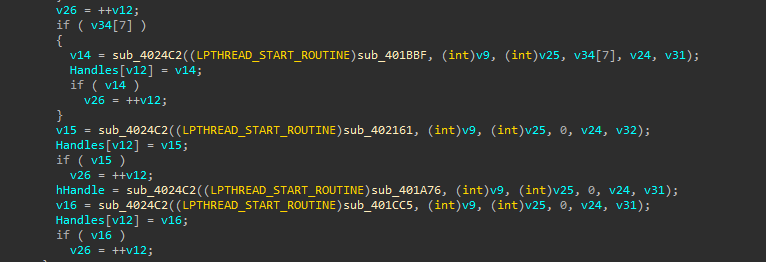 Multiple threads spawned including sub_401CC5
The function sub_401CC5 (0x00401CC5) monitors for new drives:
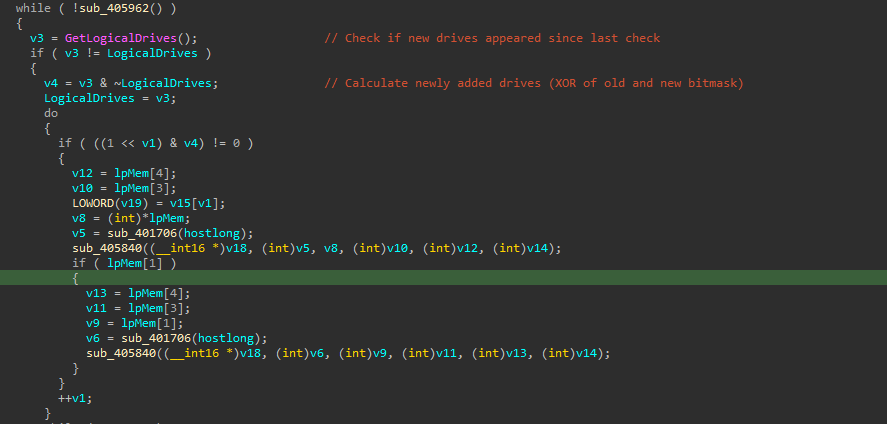 GetLogicalDrives loop detecting new drives
1
2
3
4
5
6
7
8
9
10
while ( !sub_405962() )
{
    v3 = GetLogicalDrives();          // Check current drives
    if ( v3 != LogicalDrives )        // If changed
    {
        v4 = v3 & ~LogicalDrives;     // Find NEW drives (bitwise AND NOT)
        // ... encrypt new drives
    }
    Sleep(0x3E8u);                    // Sleep 1 second (0x3E8 = 1000ms)
}
Algorithm breakdown:
GetLogicalDrives()returns a bitmask (bit 0 = A:, bit 2 = C:, etc.)v3 & ~LogicalDrivesisolates only the new bits (new drives)- Checking every 1 second ensures rapid response to new storage
When a new USB drive or network share appears, the malware immediately encrypts it — even during an active attack.
Answer: 0x00401CC5
Q11 — File Size Threshold
Question
The file size is compared to a specific value. Could you provide this value?
What we look for
Ransomware must balance encryption speed vs thoroughness:
- Small files — encrypt entirely (fast anyway)
- Large files — partial encryption (faster, still destroys data)
We search for:
- File size APIs (
GetFileSize,GetFileSizeEx) - Comparison operations before encryption function calls
- Branching logic selecting different encryption routines
Analysis
Following xrefs to GetFileSizeEx:
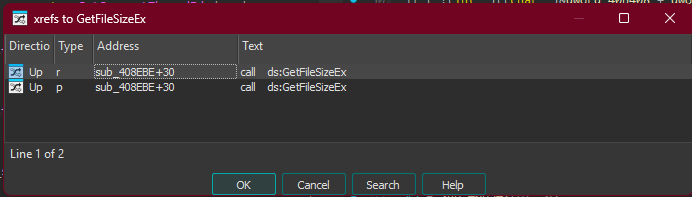 GetFileSizeEx called from sub_408EBE
In sub_408EBE (0x00408EBE), the comparison:
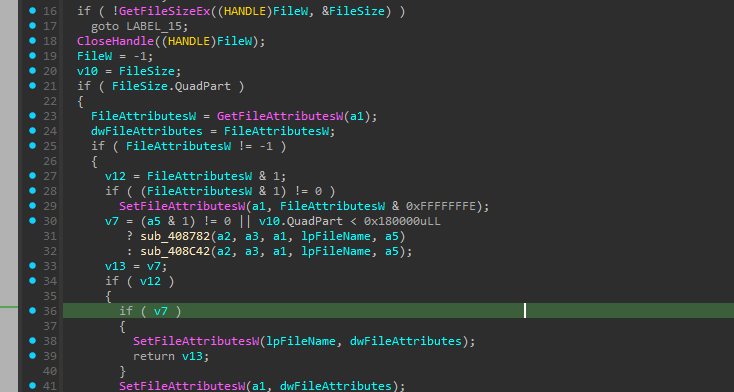 Comparison: v10.QuadPart < 0x180000
1
2
3
v7 = (a5 & 1) != 0 || v10.QuadPart < 0x180000uLL
   ? sub_408782(...)    // Small file: FULL encryption
   : sub_408C42(...);   // Large file: PARTIAL encryption
| Value | Format |
|---|---|
0x180000 | Hexadecimal |
1572864 | Decimal |
1.5 MB | Human readable |
Why 1.5 MB?
- Files under 1.5 MB are encrypted entirely — ensuring complete destruction
- Larger files (databases, archives, VMs) only have portions encrypted
- This drastically speeds up encryption while still rendering files unusable
- A 10 GB database encrypted in chunks is just as unrecoverable as fully encrypted
Answer: 1572864
Summary
| Question | Answer |
|---|---|
| Q1 - Hashing Algorithm | CRC32 |
| Q2 - .cdata Checksum | 0xD55F8833 |
| Q3 - Malware Version | v2.9.1 |
| Q4 - Masqueraded DLL | ole32.dll |
| Q5 - First API Called | CreateProcessW |
| Q6 - Process List Decrypt Address | 0x004022FB |
| Q7 - Security Disable Command | netsh advfirewall set currentprofile state off |
| Q8 - Persistence Function | 0x00401236 |
| Q9 - C2 Protocol | HTTP |
| Q10 - Drive Monitor Thread | 0x00401CC5 |
| Q11 - File Size Threshold | 1572864 |
Challenge completed. Stay safe, and always analyze malware in isolated environments.