Phobos Ransomware — Malware Analysis Walkthrough
Overview#
| Platform | CyberDefenders |
| Category | Malware Analysis |
| Difficulty | Insane |
| Focus | Ransomware · AES Config Decryption · Registry Persistence · Process Termination |
| Lab Link | Phobos |
Phobos is a well-known ransomware family that has been active since 2018. This challenge walks through analyzing a real Phobos sample, focusing on its encrypted configuration system, anti-analysis techniques, and encryption methodology.
The malware employs:
- AES-encrypted configuration with indexed entries
- CRC32 integrity checking to detect tampering
- Process termination to release file locks before encryption
- Registry persistence via Run keys
- Dual encryption strategy for small vs large files
Tools Used#
- IDA Pro (static analysis, decompilation)
- x32dbg (dynamic analysis, config extraction)
- PE-bear / DIE (PE metadata inspection)
Objective#
The goal of this analysis is to fully understand Phobos ransomware’s execution chain:
- How it protects its configuration from analysis
- How it achieves persistence and privilege escalation
- How it terminates security software before encryption
- How it decides which encryption strategy to use
By the end, we will have mapped the complete attack lifecycle from initial execution to file encryption.
Q1 — Hashing Algorithm Identification#
Question#
What is the hashing algorithm used by the malware?
What we look for#
Malware commonly uses hashing for:
- Integrity checking — verify code hasn’t been tampered
- API hashing — resolve APIs without plaintext strings
- Configuration validation — ensure encrypted config is intact
Common algorithms to watch for:
| Algorithm | Characteristics |
|---|---|
| CRC32 | Lookup table, XOR operations, 32-bit output |
| MD5 | 128-bit output, complex rounds |
| djb2 | Simple multiply-add loop, no table |
| ROR13 | Rotate-right operations |
Analysis#
During static analysis, I identified a function at sub_4085D9 (0x004085D9) performing data hashing:
int __usercall sub_4085D9@<eax>(int a1@<eax>, _BYTE *a2@<ecx>, int a3)
{
  unsigned int v3; // eax
  v3 = ~a1;
  while ( a3 )
  {
    --a3;
    v3 = lookup_table[(unsigned __int8)(v3 ^ *a2++)] ^ (v3 >> 8);
  }
  return ~v3;
}
Identification markers:
| Feature | Observation | CRC32 Signature |
|---|---|---|
| Initialization | v3 = ~a1 | ✓ Bitwise NOT |
| Lookup table | 256 entries at 0x40B000 | ✓ Precomputed table |
| Core loop | table[v3 ^ byte] ^ (v3 >> 8) | ✓ Standard CRC32 |
| Finalization | return ~v3 | ✓ Final inversion |
| Output size | 32-bit integer | ✓ CRC32 |
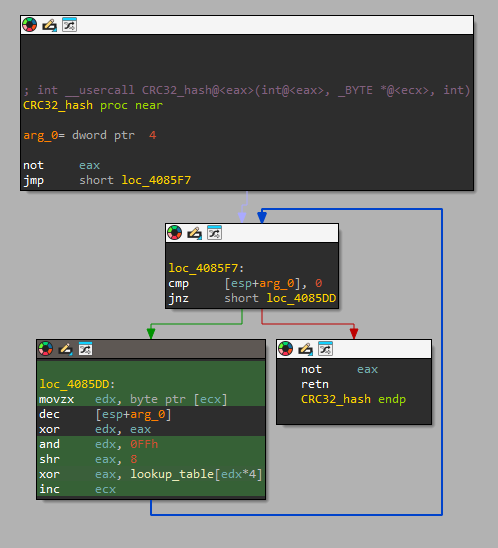
Answer: CRC32
Q2 — .cdata Checksum Value#
Question#
Could you provide the hard-coded value of the .cdata checksum?
What we look for#
After identifying a hashing algorithm, the next step is understanding how it’s used.
Common use cases:
- Anti-debugging checks
- Code integrity verification
- Configuration validation
We trace cross-references to the hash function to find where the computed hash is compared against a stored value.
Analysis#
Following xrefs to sub_4085D9 (0x004085D9), I found an integrity check in the malware’s initialization:
if ( CRC32_hash(0, v0, dword_40B40C) != dword_40B430 )
    return;  // Exit if tampered
This is an anti-tampering mechanism — the malware verifies its .cdata section hasn’t been modified.
The hardcoded checksum at dword_40B430 (0x0040B430):
.data:0040B430 dword_40B430 dd 0D55F8833h ; DATA XREF: real_Start+62↑rThis anti-tampering mechanism serves multiple purposes:
- Prevents AV modification — if antivirus patches the binary, it won’t run
- Detects analyst tampering — modifications during analysis will fail
- Ensures payload integrity — encrypted config must be intact
Answer: 0xD55F8833
Q3 — Malware Version#
Question#
What is the malware’s version?
What we look for#
Ransomware families like Phobos store configuration in encrypted blobs to evade static analysis. To extract config values, we need to:
- Identify the decryption function — usually takes an index/ID parameter
- Set breakpoints at function entry and return
- Monitor parameters to understand which config is being decrypted
- Capture return values containing decrypted strings
This approach reveals all encrypted strings without needing to reverse the encryption algorithm.
Analysis#
The malware stores its configuration in an AES-encrypted blob. I identified two key functions:
| Function | Address | Purpose |
|---|---|---|
sub_4062A6 | 0x004062A6 | Initialize config structure |
sub_406347 | 0x00406347 | Decrypt config entry by ID |
Dynamic Extraction#
To find the version, I set breakpoints in x32dbg:
- Entry breakpoint at
sub_406347(0x00406347) — check[esp+4]for config ID - Return breakpoint at 0x00406431 — check
EAXfor decrypted data pointer
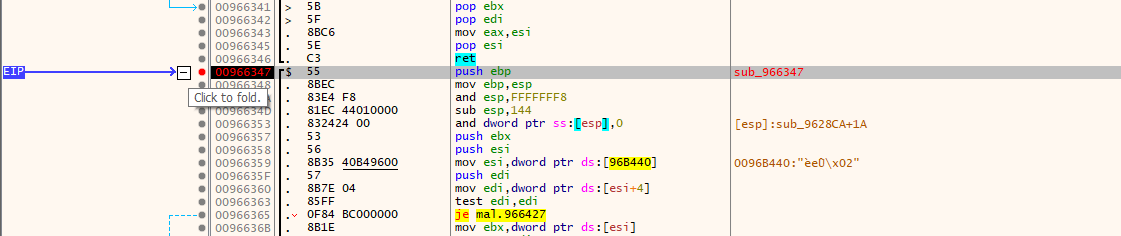
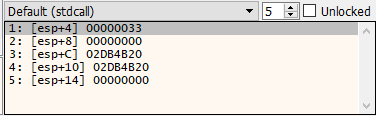
After stepping over, EAX contains the decrypted version string:
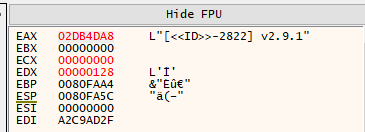
The version format [<<ID>>-XXXX] vX.X.X is characteristic of Phobos variants, where:
<<ID>>— placeholder for victim ID2822— campaign/affiliate identifierv2.9.1— actual version number
Answer: v2.9.1
Q4 — DLL Masquerading#
Question#
The malware masquerades as a legitimate Windows DLL. Which DLL does it impersonate?
What we look for#
Malware often disguises itself using legitimate-sounding names to:
- Evade casual inspection
- Blend in with legitimate system files
- Bypass simple allowlist-based security
We inspect PE metadata (Version Information resource) to identify claimed identity.
Analysis#
Using DIE to inspect the Version Information resource:
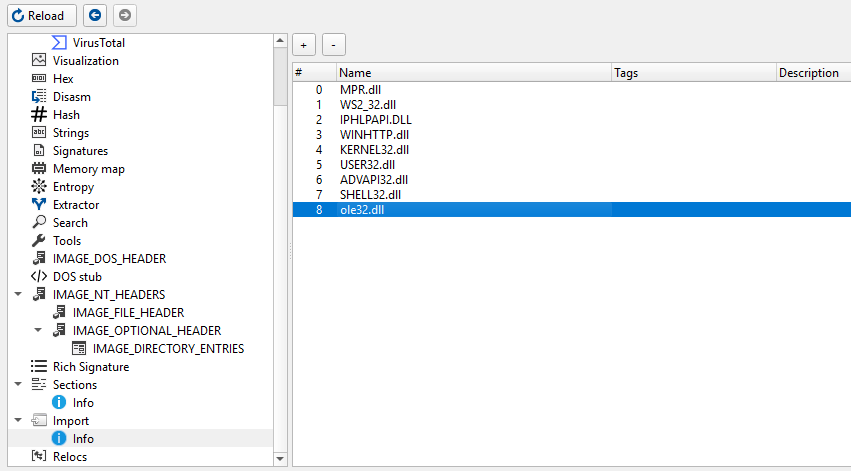
The malware claims to be ole32.dll — Microsoft’s OLE (Object Linking and Embedding) library.
Why ole32.dll? The malware legitimately imports OLE32 functions:
CoInitializeEx/CoUninitializeCoCreateInstance
These are used for WMI access to delete shadow copies. The masquerade creates a coherent cover story.
Why this matters:
- If security tools see
ole32.dllmaking COM calls, it appears normal - The real
ole32.dllis a core Windows component, not suspicious - Sophisticated masquerading — not just random name choice
Answer: ole32.dll
Q5 — First API Function Called#
Question#
Could you provide the first API function that is called by the malware?
What we look for#
Understanding the first API call reveals the malware’s immediate priorities:
- Privilege escalation?
- Environment detection?
- Anti-analysis checks?
We trace execution from the entry point, following the call chain until we hit an external API.
Analysis#
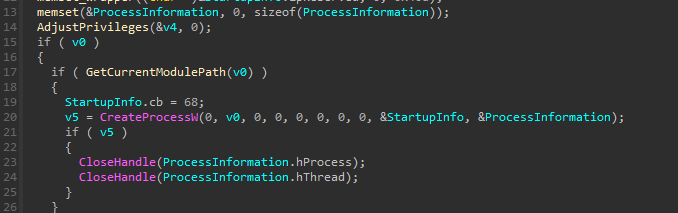
Tracing from the entry point sub_402FA7 (0x00402FA7) → sub_4029F5 (0x004029F5), I found the first significant operation:
The malware checks if it’s running with elevated privileges. If not, it attempts to restart itself with elevated privileges via sub_40489E (0x0040489E):
BOOL sub_40489E()
{
  // ...
  StartupInfo.cb = 68;
  v5 = CreateProcessW(0, v0, 0, 0, 0, 0, 0, 0, &StartupInfo, &ProcessInformation);
  // ...
}
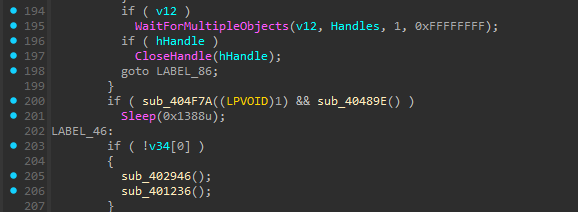
Before any encryption or spreading occurs, the malware calls CreateProcessW to elevate privileges.
Execution flow:
Entry Point (sub_402FA7)
    ↓
MalwareMain (sub_4029F5)
    ↓
Check if Admin (IsElevated)
    ↓
If not admin → RestartAsAdmin (sub_40489E)
    ↓
CreateProcessW ← FIRST API CALL
This is a classic UAC bypass pattern — restart with elevated privileges before performing destructive operations.
Answer: CreateProcessW
Q6 — Process List Decryption Address#
Question#
Could you provide the address at which the process list decryption function is called?
What we look for#
Ransomware must kill processes that hold file locks before encryption:
- Database servers (SQL, Oracle, MySQL)
- Office applications (Excel, Word)
- Backup software (Veeam, Acronis)
- Email clients (Outlook, Thunderbird)
We search for:
- Process enumeration APIs (
CreateToolhelp32Snapshot,Process32First/Next) - Process termination (
TerminateProcess) - Then trace back to find where the kill list is decrypted
Analysis#
Ransomware typically kills processes that lock files (SQL, backup software, etc.).
I found sub_4022EE (0x004022EE) — the process killer thread:
int __stdcall sub_4022EE(LPVOID lpThreadParameter)
{
  v5 = (__int16 *)sub_406347(10, 0);  // ← Decrypt config ID 10 (process list)
  // ...
  while ( !sub_405962() )
  {
    sub_404DEE(lpMem);   // Kill matching processes
    Sleep(0x1F4u);
  }
}
The call to sub_406347 (0x00406347) with config index 10 happens at address 0x004022FB:
.text:004022F9  push    0Ah              ; Config ID = 10 (process list)
.text:004022FB  call    sub_406347       ; ← THIS ADDRESS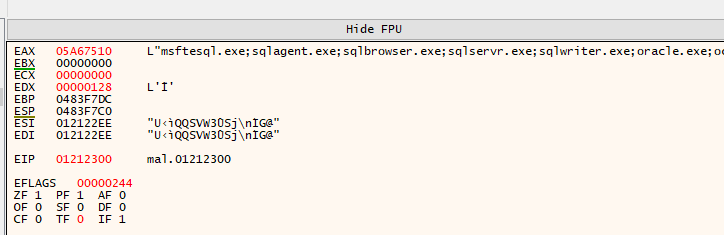
Decrypted process kill list includes:
| Category | Processes |
|---|---|
| SQL Servers | msftesql, sqlagent, sqlservr, mysql |
| Oracle | oracle, ocssd, dbsnmp |
| Office Apps | excel, outlook, powerpnt, onenote |
| thunderbird, thebat | |
| Backup | sqbcoreservice |
These processes hold exclusive locks on database files, documents, and emails. Killing them allows the ransomware to encrypt files that would otherwise be inaccessible.
Answer: 0x004022FB
Q7 — First Security Disable Command#
Question#
What’s the first command the malware uses to turn off a critical security measure?
What we look for#
Before encryption, ransomware typically:
- Disables Windows Firewall — prevent network-based detection
- Deletes shadow copies — prevent recovery via VSS
- Disables Windows Defender — evade real-time protection
- Clears event logs — destroy forensic evidence
We monitor decrypted config strings for shell commands.
Analysis#
Setting a breakpoint on the config decryption function and monitoring returns, I captured:
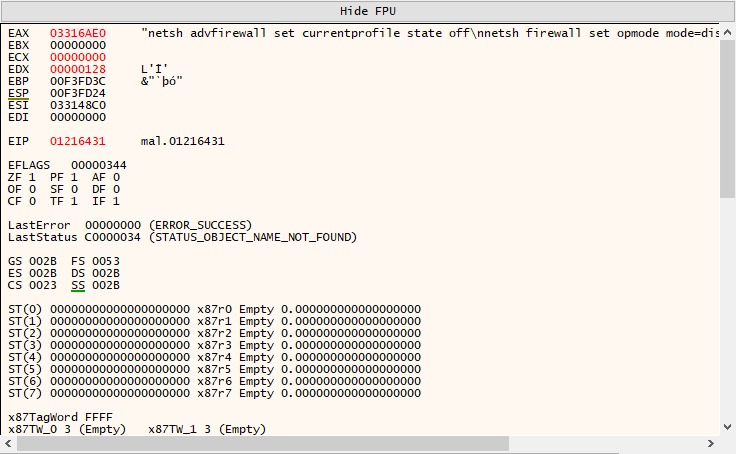
netsh advfirewall set currentprofile state off
netsh firewall set opmode mode=disable
exit
The first command disables Windows Firewall using the modern netsh advfirewall syntax.
Command breakdown:
| Command | Purpose | Windows Version |
|---|---|---|
netsh advfirewall set currentprofile state off | Disable firewall | Vista+ |
netsh firewall set opmode mode=disable | Disable firewall | XP (legacy) |
The malware includes both commands for maximum compatibility across Windows versions.
Why disable the firewall?
- Allow C2 communication without interference
- Enable lateral movement across the network
- Prevent network-based security tools from blocking traffic
Answer: netsh advfirewall set currentprofile state off
Q8 — Persistence Function Address#
Question#
Could you provide the address of the function used by the malware for persistence?
What we look for#
Ransomware persistence ensures the malware survives reboots and can:
- Continue encryption if interrupted
- Re-encrypt new files after restart
- Maintain foothold for additional attacks
Common persistence mechanisms:
- Registry Run keys —
HKLM/HKCU\...\Run - Scheduled Tasks —
schtasks.exe - Services —
sc.exe create - Startup folder —
shell:startup
We search for registry APIs: RegOpenKeyEx, RegSetValueEx, RegCreateKey.
Analysis#
Following xrefs to RegSetValueExW:
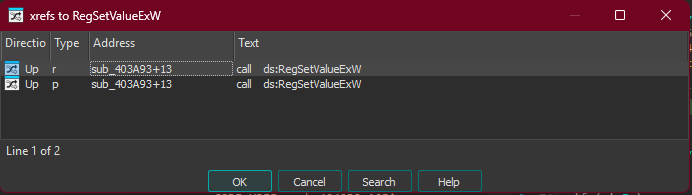
This leads to sub_403A93 (0x00403A93), which is called from the main persistence function:
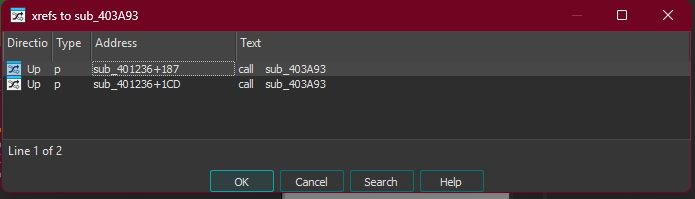
The persistence function at sub_401236 (0x00401236):
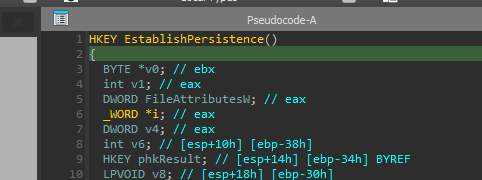
This function:
- Copies itself to a new location
- Writes to
HKLM\...\RunandHKCU\...\Run - Sets the copied file as HIDDEN (attribute 0x2)
Persistence locations:
| Registry Key | Scope |
|---|---|
HKLM\SOFTWARE\Microsoft\Windows\CurrentVersion\Run | All users (requires admin) |
HKCU\SOFTWARE\Microsoft\Windows\CurrentVersion\Run | Current user only |
By writing to both locations, the malware ensures persistence regardless of privilege level.
Answer: 0x00401236
Q9 — C2 Communication Protocol#
Question#
What protocol is used by the malware for C2 communication?
What we look for#
Malware C2 communication typically uses:
- HTTP/HTTPS — blends with normal web traffic
- DNS — often allowed through firewalls
- Custom protocols — harder to detect but more suspicious
We check the Import Address Table (IAT) for networking libraries.
Analysis#
Examining the import table reveals WINHTTP.dll imports:

| Import | Purpose |
|---|---|
WinHttpOpen | Initialize WinHTTP |
WinHttpConnect | Connect to server |
WinHttpOpenRequest | Create HTTP request |
WinHttpSendRequest | Send request |
WinHttpReceiveResponse | Receive response |
All WinHttp* functions = HTTP protocol.
Why HTTP?
- Blends with normal web traffic
- Usually allowed through corporate firewalls
- Easy to implement and debug
- Can be tunneled through proxies
Answer: HTTP
Q10 — Drive Monitor Thread Address#
Question#
Could you provide the address of the thread used to check continuously for new disk connections?
What we look for#
Ransomware often monitors for new storage devices to maximize damage:
- USB drives inserted during encryption
- Network shares mounted after initial scan
- External drives connected by users
We search for:
GetLogicalDrives— returns bitmask of available drives- Thread creation with drive-related logic
- Loop patterns with sleep intervals
Analysis#
Looking at thread creation in the main function:
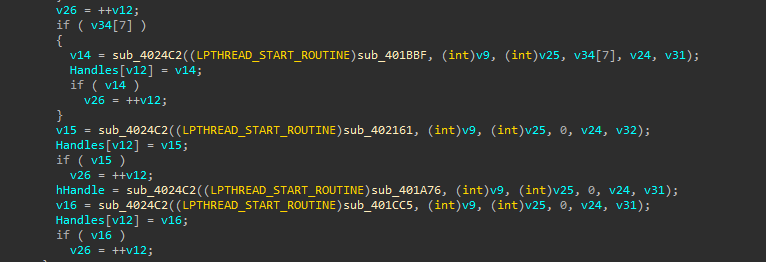
The function sub_401CC5 (0x00401CC5) monitors for new drives:
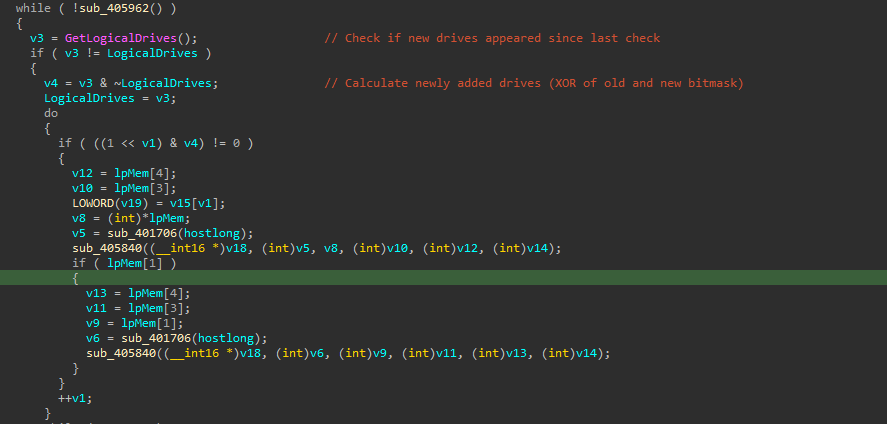
while ( !sub_405962() )
{
    v3 = GetLogicalDrives();          // Check current drives
    if ( v3 != LogicalDrives )        // If changed
    {
        v4 = v3 & ~LogicalDrives;     // Find NEW drives (bitwise AND NOT)
        // ... encrypt new drives
    }
    Sleep(0x3E8u);                    // Sleep 1 second (0x3E8 = 1000ms)
}
Algorithm breakdown:
GetLogicalDrives()returns a bitmask (bit 0 = A:, bit 2 = C:, etc.)v3 & ~LogicalDrivesisolates only the new bits (new drives)- Checking every 1 second ensures rapid response to new storage
When a new USB drive or network share appears, the malware immediately encrypts it — even during an active attack.
Answer: 0x00401CC5
Q11 — File Size Threshold#
Question#
The file size is compared to a specific value. Could you provide this value?
What we look for#
Ransomware must balance encryption speed vs thoroughness:
- Small files — encrypt entirely (fast anyway)
- Large files — partial encryption (faster, still destroys data)
We search for:
- File size APIs (
GetFileSize,GetFileSizeEx) - Comparison operations before encryption function calls
- Branching logic selecting different encryption routines
Analysis#
Following xrefs to GetFileSizeEx:
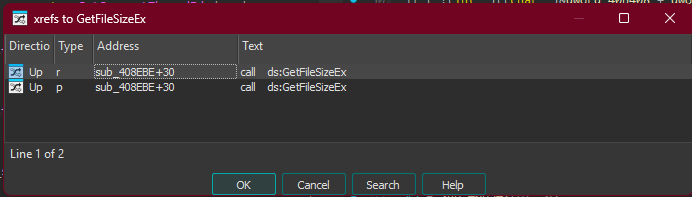
In sub_408EBE (0x00408EBE), the comparison:
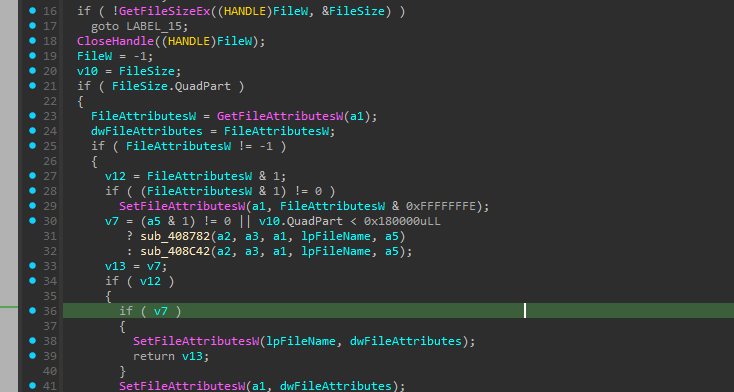
v7 = (a5 & 1) != 0 || v10.QuadPart < 0x180000uLL
   ? sub_408782(...)    // Small file: FULL encryption
: sub_408C42(...); // Large file: PARTIAL encryption| Value | Format |
|---|---|
0x180000 | Hexadecimal |
1572864 | Decimal |
1.5 MB | Human readable |
Why 1.5 MB?
- Files under 1.5 MB are encrypted entirely — ensuring complete destruction
- Larger files (databases, archives, VMs) only have portions encrypted
- This drastically speeds up encryption while still rendering files unusable
- A 10 GB database encrypted in chunks is just as unrecoverable as fully encrypted
Answer: 1572864
Summary#
| Question | Answer |
|---|---|
| Q1 - Hashing Algorithm | CRC32 |
| Q2 - .cdata Checksum | 0xD55F8833 |
| Q3 - Malware Version | v2.9.1 |
| Q4 - Masqueraded DLL | ole32.dll |
| Q5 - First API Called | CreateProcessW |
| Q6 - Process List Decrypt Address | 0x004022FB |
| Q7 - Security Disable Command | netsh advfirewall set currentprofile state off |
| Q8 - Persistence Function | 0x00401236 |
| Q9 - C2 Protocol | HTTP |
| Q10 - Drive Monitor Thread | 0x00401CC5 |
| Q11 - File Size Threshold | 1572864 |
Challenge completed. Stay safe, and always analyze malware in isolated environments.